
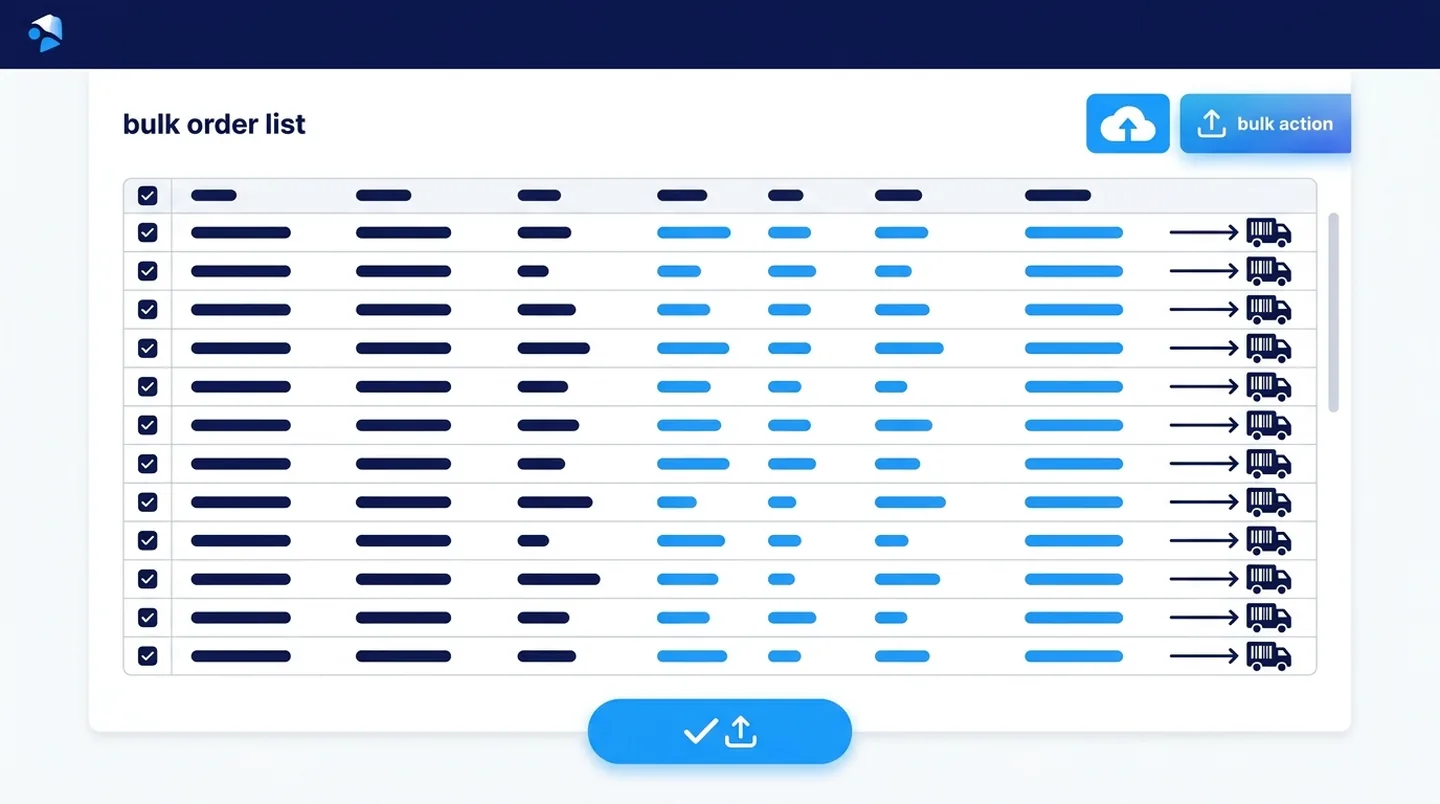
Blog post overview and metadata
Author, publish date, read time, and category
Shopify Bulk Order Fulfillment — Fulfill Hundreds of Orders Fast (Free)
Reviewed by: ARS Developer Team | Updated: 30 Sep 2026 | UK Focus: Buyer-intent SEO, web delivery, and measurable conversion growth.
Quick Summary
Stop fulfilling Shopify orders one by one. Learn how to bulk-fulfill hundreds of orders from a CSV, add tracking numbers in one click and notify every customer automatically — free with PackSlip.
In This Guide
Why This Article Is Trustworthy
- Reviewed by the ARS Developer editorial team for UK business relevance.
- Structured around buyer-intent SEO, technical delivery, and measurable conversion outcomes.
- Connected to related service pages, pricing guidance, and supporting articles for stronger topic depth.
If you process more than a handful of Shopify orders a day, fulfilling them one by one is a daily time sink. You open each order, paste a tracking number, mark it fulfilled, repeat. For dropshipping and print-on-demand stores handling 50 to 500 orders a day, that is hours lost every single day.
This guide shows how to bulk-fulfill Shopify orders from a CSV — add every tracking number, mark all orders fulfilled and notify every customer automatically — completely free with PackSlip.
Why Shopify's Default Fulfillment Slows You Down
Shopify lets you fulfill orders manually one at a time, or fulfill in bulk without tracking. But when your courier or 3PL returns a spreadsheet of tracking numbers, there is no native way to match those tracking numbers back to orders and fulfill them in bulk. You end up copying and pasting, order by order — and every mistake means a customer with the wrong tracking link.
How to Bulk-Fulfill Shopify Orders With PackSlip
- Install PackSlip free from packslip.arsdeveloper.co.uk. No credit card required.
- Export your pending orders from Shopify as a CSV.
- Add tracking numbers from your courier or 3PL into the CSV next to each order.
- Upload the CSV into PackSlip's bulk fulfillment module.
- PackSlip marks every order fulfilled in Shopify and sends the shipping notification to each customer automatically.
Hundreds of orders fulfilled in one action, with every customer notified — no manual copy-paste.
Who Benefits Most
- Dropshipping stores that receive bulk tracking CSVs from suppliers.
- Print-on-demand brands fulfilling large daily batches.
- 3PL and warehouse users who get tracking exports in spreadsheets.
- Any store spending more than 30 minutes a day on manual fulfillment.
What Does It Cost?
Nothing. Bulk fulfillment is one of PackSlip's 34 free modules. Comparable standalone bulk-fulfillment apps charge around $15/month — PackSlip includes it, plus branded packing slips, order tracking and WhatsApp alerts, at $0.
Where bulk fulfilment actually breaks
Fulfilling hundreds of orders at once runs into Shopify's API rate limits, and a tool that does not handle them politely will fail part-way through — leaving some orders fulfilled, some not, and no clear record of which. The recovery is worse than doing it by hand.
Ask how the tool handles a partial failure. Retrying with increasing delays and a report of exactly what succeeded is the difference between a bulk action you can trust on a busy day and one you only use when there is time to check it afterwards.
Tracking numbers are where the errors hide
Bulk fulfilment usually means importing a spreadsheet from the courier, and spreadsheets are where tracking numbers get mangled: leading zeros stripped, long numbers turned into scientific notation, order references matched to the wrong row. The customer receives a confirmation with somebody else's tracking number.
Import the file as text, match on order name rather than row order, and have the tool show you a preview before it sends anything. One wrong column on a hundred orders is a hundred support conversations.
Frequently Asked Questions
Can I bulk-upload tracking numbers from a CSV?
Yes. Upload a CSV of order numbers and tracking numbers and PackSlip fulfills each order and notifies each customer in one action.
Are customers notified automatically?
Yes. Shopify's shipping notification (and optional WhatsApp alert) is sent to each customer as the order is fulfilled.
Is there an order limit?
No. There are no order caps or usage limits on any PackSlip module.
Does it work on all Shopify plans?
Yes — Basic, Shopify, Advanced and Plus.
Next Step Resources
Move from research into action with the most relevant service, proof, pricing, and project planning pages for this topic.

Tags:




























































Leave a Comment
Ask a practical question, share a project insight, or add a useful note. Every comment is reviewed before it appears publicly.